What Is a TRN Number in the UAE and Why It Matters for Your Business
What is a TRN number? Discover what a Tax Registration Number is, why it's essential for UAE VAT, and how it impacts your e-invoicing compliance with the FTA.
Posted by
 Tadqiq Team
Related Reading
A Practical Guide to E-Invoicing in the UAE
Master e invoicing in UAE. This guide breaks down the PINT AE standard, FTA compliance deadlines, and how to prepare your business for the 2026 mandate.
Read →
A Practical Guide to HS Codes for Dubai Customs & E-Invoicing Compliance
Discover hs codes dubai customs and learn how accurate classifications speed up UAE trade, FTAs, and customs clearance.
Read →
A Guide to TRN Verification FTA for UAE E-Invoicing
Master TRN verification FTA for UAE e-invoicing. Our guide covers manual checks, APIs, and batch validation to ensure VAT compliance and avoid penalties.
Read →
Navigating the UAE's tax landscape requires understanding key identifiers, and none is more important than the Tax Registration Number (TRN). This isn't just an administrative detail; it's the foundation of your company's tax compliance and a critical component for the upcoming UAE e-invoicing mandate. Getting it right ensures smooth operations, while a simple mistake can lead to payment delays and compliance issues.
Think of a Tax Registration Number (TRN) as your business's unique fingerprint in the eyes of the UAE's Federal Tax Authority (FTA). It's a 15-digit number that proves you're officially registered for Value Added Tax (VAT). This number is the bedrock of your tax compliance, linking every transaction back to your business for VAT purposes.
The TRN: Your Key to UAE Tax Compliance
As the UAE moves towards mandatory e-invoicing, understanding your TRN is more important than ever. It's your essential pass for conducting smooth B2B and B2G transactions.
Every VAT-registered business is issued one of these unique 15-digit identifiers, which always follows a purely numeric format (for example, 100234567890123). This number links your entity directly to the FTA and must appear on official documents like your VAT registration certificate and all your tax invoices.
For a quick overview, here's a simple breakdown of what a TRN entails.
TRN at a Glance
| Attribute | Details |
|---|---|
| What It Is | A unique 15-digit identifier for VAT-registered businesses. |
| Issued By | The Federal Tax Authority (FTA) of the UAE. |
| Format | Always a 15-digit numeric code (e.g., 100234567890123). |
| Where to Find It | On your FTA VAT registration certificate and tax invoices. |
| Key Purpose | To identify your business for all VAT-related transactions and reporting. |
Essentially, your TRN is the key that unlocks compliant financial operations, from issuing valid tax invoices to ensuring your business is ready for the new PINT AE e-invoicing standards. You can find more details about its role over at taxready.ae.

Understanding the Tax Registration Number (TRN)
The Tax Registration Number (TRN) is a unique 15-digit code that the UAE's Federal Tax Authority (FTA) assigns to every business registered for Value Added Tax (VAT). It serves as your company's official tax identity within the UAE system.
Think of it this way: just as an Emirates ID proves an individual's identity, the TRN confirms your business's registered status for all VAT UAE activities.
The Anatomy of a TRN
Knowing what a TRN looks like is the first step to avoiding simple mistakes that can cause major headaches down the line. A genuine UAE TRN has a very specific format.
- Who Issues It? Only the Federal Tax Authority (FTA) can issue a TRN.
- What's the Format? It's always a 15-digit number (like 100123456789012). You'll never see letters, hyphens, or any other symbols.
- Where Does It Go? You are legally required to show this number on all your tax invoices, credit notes, and any other document related to VAT.
This 15-digit number is the key to FTA compliance. Without a valid TRN, a business cannot legally charge VAT. Consequently, its customers cannot reclaim that tax, creating a costly problem for everyone involved in the transaction.
This single identifier is the bedrock of the UAE’s tax system. It ensures every dirham is tracked correctly and will be even more critical with the rollout of the new UAE e-invoicing system, known as PINT AE.
Why Your TRN Is Critical for VAT and E-Invoicing
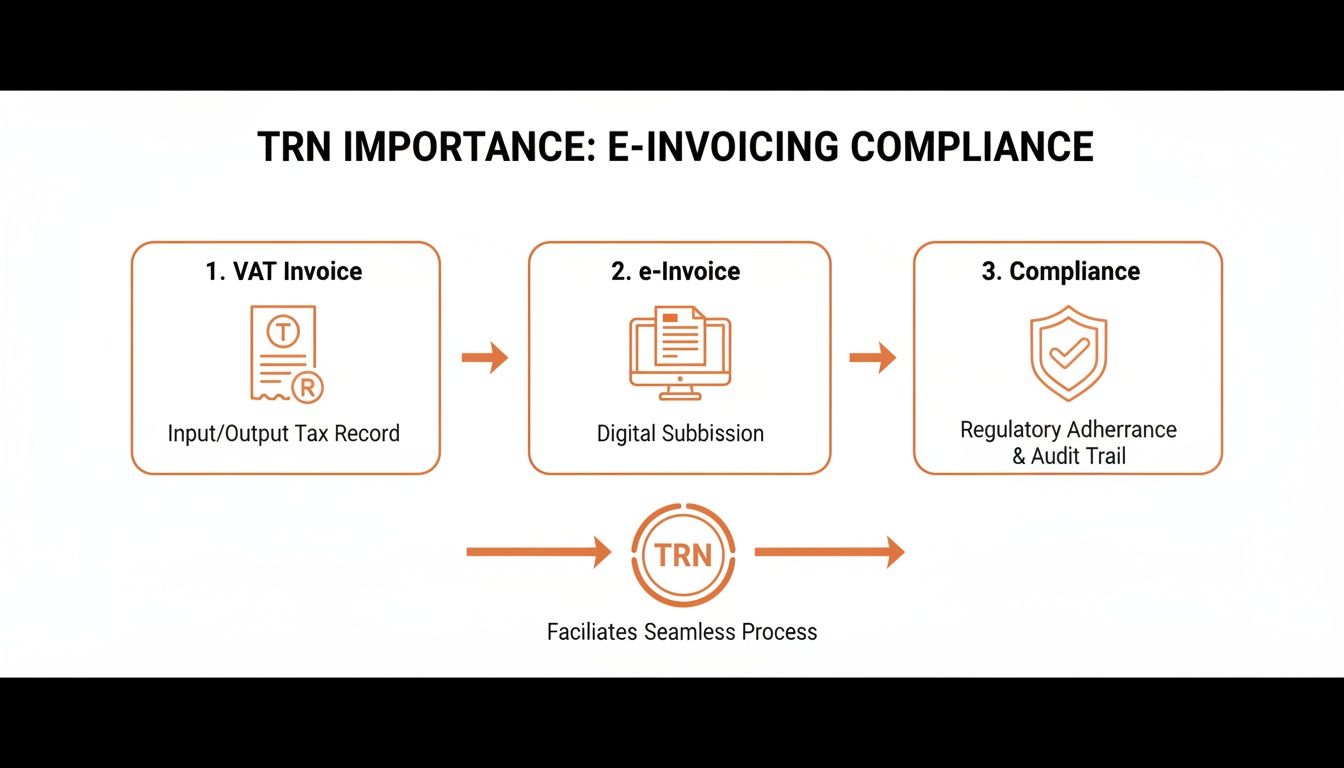
Your Tax Registration Number is more than just a formality; it's the central pillar of your financial operations in the UAE. It is deeply embedded in both current VAT regulations and the fast-approaching UAE e-invoicing mandate.
Under existing VAT UAE law, displaying your TRN on every tax invoice is mandatory. That string of numbers legally authorises you to add the 5% VAT to your sales. Just as importantly, it's what your customers need to see to claim their input tax credits.
The Foundation of a Valid Tax Invoice
Let's get practical. Imagine you run a consultancy firm in Abu Dhabi. The 15-digit TRN issued by the FTA upon your VAT registration must appear on every invoice you send and every tax return you file. Without it, you can't legally charge VAT or reclaim the VAT you paid on your business expenses. For more details, refer to official publications like the FTA 2024 annual report.
Here’s a real-world example: A construction company in Dubai purchases AED 100,000 worth of materials.
- With a valid TRN on the supplier's invoice: The company can easily reclaim the AED 5,000 in VAT it paid, protecting its cash flow.
- Without a valid TRN (or an incorrect one): That AED 5,000 is lost. The company cannot reclaim it, turning a recoverable tax into a direct business cost.
Getting Ready for PINT AE and E-Invoicing
As the UAE transitions to mandatory e-invoicing, the TRN's importance will only grow. Under the new PINT AE standard, your TRN isn't just for display; it’s a required data field on every digital e-invoice.
An e-invoice sent to the government's platform with a missing or incorrect TRN won't just be flagged for review—it will be instantly rejected. This is not a minor paperwork issue; it has immediate financial consequences, such as delayed payments and strained supplier relationships.
This also places your business under a compliance spotlight, increasing the risk of an FTA audit and potential penalties. Ensuring your TRN data is clean and correct is no longer just good practice; it is an absolute necessity for operating in the UAE's new digital tax environment. To get a better handle on what's coming, have a look at our detailed guide on UAE e-invoicing.
How to Find and Verify Any TRN Number
Finding your own TRN is simple, but verifying a supplier's TRN is just as easy—and a non-negotiable step for your business. Think of this quick check as your first line of defence against invoice errors and potential fraud.
Your TRN is printed on the official VAT registration certificate you received from the Federal Tax Authority (FTA). You can also find it by logging into your account on the FTA's e-services portal. It should also be clearly stated on every tax invoice you issue or receive.
Using the FTA’s Official Verification Tool
Beyond knowing your own number, it's crucial to verify the TRNs of your business partners. The FTA provides an official TRN Verification tool, a free and instant way to confirm if a number is legitimate.
Here’s how straightforward it is:
- Go to the FTA's TRN Verification service page.
- Type the 15-digit TRN you need to check into the search box.
- Complete the simple security check.
- Click "Validate," and you'll get the result immediately.
The system will instantly confirm if the TRN is valid and display the legal name of the business it's registered to, in both English and Arabic. For a more detailed walkthrough, check out our complete guide on the FTA TRN verification process.
Running this check ensures the TRN on an invoice is genuine, protecting you from incorrectly claiming input tax and helping you maintain solid FTA compliance. A valid TRN is the essential link between a transaction and the tax system, whether you're dealing with a paper invoice or a modern e-invoice.
Avoiding Common and Costly TRN Mistakes
A simple mistake with a Tax Registration Number can cause significant trouble, from rejected e-invoices and delayed payments to unwanted attention from the FTA. Getting ahead of these common slip-ups is key to maintaining a smooth and compliant invoicing process.
Why Do TRN Errors Occur?
Most TRN issues stem from small oversights with large consequences. A single typo in a 15-digit TRN is enough to get an e-invoice rejected. The same applies when using a TRN from a supplier who has cancelled their VAT registration; it might have been valid yesterday, but it is not today.
Data migration between systems is another common source of errors. When exporting information from your accounting software, formatting issues like extra spaces or non-numeric characters can cause an automated e-invoice system to fail.
A mismatch between the supplier's TRN and their official legal name is also a frequent mistake. This often happens when an invoice lists a trading name (e.g., "Dubai Tech Solutions") while the TRN is registered to the legal entity ("Dubai Tech Solutions FZ-LLC"). Under the strict PINT AE rules, this is an instant validation failure.
Proactive validation allows you to find and correct these errors before an e-invoice is ever sent. This simple shift in process protects your cash flow and keeps you in good standing with the FTA.
This is where automated validation tools really shine. A platform like Tadqiq acts as your first line of defence, checking invoice data against official rules like PINT AE's BR-AE-10 (which specifically validates the TRN format). By flagging issues upfront, you can resolve them immediately and prevent costly rejections.
Common TRN Errors and How to Prevent Them
Here’s a breakdown of the most frequent TRN-related problems and the straightforward steps you can take to avoid them.
| Common Mistake | Potential Consequence | Preventative Solution |
|---|---|---|
| Simple Typos | The 15-digit TRN is invalid, leading to immediate e-invoice rejection. | Implement a "four-eyes" principle for manual data entry or use software with built-in checksum validation. |
| Outdated TRN | Using a TRN from a supplier who has since deregistered from VAT causes a validation failure. | Regularly verify your suppliers' TRNs against the official FTA database, especially before major transactions. |
| Incorrect Formatting | Extra spaces, hyphens, or special characters in the TRN field lead to automated system rejection. | Cleanse data automatically before generating the e-invoice. Ensure your ERP system exports clean, number-only TRNs. |
| TRN-Name Mismatch | The supplier's legal name on the invoice doesn't match the name registered to the TRN with the FTA. | Always confirm the supplier's exact legal name as registered with the FTA and use that on all official documents. |
Ultimately, a little diligence goes a long way. By building these simple checks into your invoicing workflow, you can turn a common source of frustration into a seamless and efficient process.
Turning Your TRN Into a Real Business Advantage
Your Tax Registration Number is far more than a compliance requirement; it is a financial passport for your business in the UAE. It is essential for your company's integrity, crucial for daily VAT dealings, and absolutely vital for the upcoming UAE e-invoicing system.
The key takeaway is that a reactive approach to TRN accuracy is no longer sufficient. Adopting a simple, regular habit of verifying your own TRN and those of your suppliers is a game-changer. It protects your cash flow, prevents frustrating invoice rejections, and ensures you meet your FTA compliance obligations.
By taking this proactive approach, you can transform a potential compliance headache into a genuine business asset. Your transactions will run smoother, faster, and more securely, building a solid foundation of accuracy that prepares your business for the next phase of the UAE's digital tax journey.
A proactive approach to TRN validation is the difference between seamless compliance and a constant cycle of fixing rejected invoices. By treating your TRN as a critical business asset, you ensure financial accuracy and operational efficiency.
Ready to make your e-invoicing process smoother? See how Tadqiq can help you achieve effortless compliance.
Frequently Asked Questions About the UAE TRN
Here are answers to some of the most common questions we receive from UAE business owners and finance managers about the Tax Registration Number.
Do I Need a TRN if My Business Is Below the VAT Threshold?
Not necessarily. If your annual taxable supplies fall below the mandatory registration threshold of AED 375,000, you are not required to register for VAT and will not have a TRN.
However, you can choose to register voluntarily if your supplies exceed AED 187,500. Once registered, you will be issued a TRN and must comply with all standard VAT rules. It's wise to monitor FTA guidelines as the UAE e-invoicing mandate approaches, as new rules may apply.
What Happens if I Use an Incorrect TRN on an Invoice?
Using the wrong TRN on an invoice can create significant problems. Your customer will be unable to reclaim their input VAT, which could lead to payment disputes and damage a good business relationship.
With the new PINT AE e-invoicing system, any invoice with an incorrect TRN will be rejected by the government's platform. This causes payment delays for you and compliance headaches for your team. It also serves as a red flag that could attract unwanted attention from the FTA and potential penalties.
Can a Single Company Have Multiple TRNs?
No, a single legal entity is assigned only one TRN. The main exception is for businesses structured as a 'Tax Group'.
In a Tax Group, several related companies are treated as a single taxpayer for VAT purposes. The entire group shares one Group TRN, and every member company must use that specific number on all their invoices. It is crucial that your ERP system is configured to handle this correctly.
How Does Tadqiq Help with TRN Validation?
Tadqiq acts as your automated pre-flight check for e-invoices. Before submitting to the official platform, you can upload invoice data from any ERP system into Tadqiq.
Our platform instantly validates it against all official PINT AE business rules, including TRN format and validity. If it finds an error, such as 'BR-AE-10 invalid TRN', it provides a clear explanation in plain English. Your team can then fix the issue immediately, preventing rejections and ensuring FTA compliance from day one.
Ready to streamline your e-invoicing? Try Tadqiq today at tadqiq.ae.